Class PythonParser
Represents a class that performs syntax and lexical analysis of specified Python code text.
public class PythonParser : SyntaxParser, IComponent, IDisposable, ISyntaxParser, IParser, ILexer, INotify, IUpdate, IImport- Inheritance
-
PythonParser
- Implements
- Derived
Examples
Here is how to declare a PythonParser and assign it to the edit control from the C# code:
public partial class Form1 : Form
{
    public Form1()
    {
        InitializeComponent();
    }

    private void Form1_Load(object sender, EventArgs e)
    {
        var parser = new Alternet.Syntax.Parsers.Python.PythonParser();
        var edit = new Alternet.Editor.SyntaxEdit();
        edit.Parent = this;
        edit.Lexer = parser;

        string fileName = "myfile.py";
        if (System.IO.File.Exists(fileName))
        {
            parser.FileName = fileName;
            edit.LoadFile(fileName);
        }
    }
}
Here is how to declare a PythonParser and assign it to the edit control from the Visual Basic code:
Partial Public Class Form1
    Inherits Form

    Public Sub New()
        InitializeComponent()
    End Sub

    Private Sub Form1_Load(ByVal sender As Object, ByVal e As EventArgs)
        Dim parser = New Alternet.Syntax.Parsers.Python.PythonParser()
        Dim edit = New Alternet.Editor.SyntaxEdit()
        edit.Parent = Me
        edit.Lexer = parser
        Dim fileName As String = "myfile.py"

        If System.IO.File.Exists(fileName) Then
            parser.FileName = fileName
            edit.LoadFile(fileName)
        End If
    End Sub
End Class
Remarks
PythonParser is a non-visual component designed to perform syntax highlighting for the Python language. This parser supports full syntax and semantic analysis of the Python code. When linked to the SyntaxEdit or TextEditor controls, this parser drives additional features such as code completion, code outlining, code formatting, highlighting types in different colors, and underlying syntax and semantic errors and warnings.
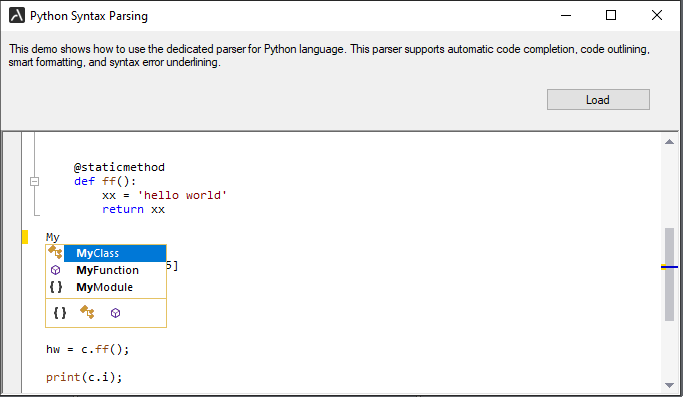
Here are some of the essential features provided by the PythonParser:
- Syntax Highlighting
- IntelliSense (Code completion)
- Signature Help (displaying parameter information for methods)
- Code Outlining
- Structure guidelines
- Formatting a selected block of text or the whole document.
- Finding declarations and references
Constructors
- PythonParser()
Initializes a new instance of the
PythonParserclass with default settings.
Fields
Properties
- CaseSensitive
Gets or sets a boolean value that indicates whether
SyntaxParsershould perform case-sensitive analysis of its content.
Methods
- CodeCompletion(string, StringItemInfo[], Point, CodeCompletionArgs)
Performs code completion for the specified text representing language element.
- CreateRepository()
Creates
ICodeCompletionRepositoryto perform code completion functionality for this parser.
- FindDeclaration(Point, bool)
Finds the declaration node at given position.
- FindDeclaration(string, Point)
Finds the declaration node at given position.
- FindReferences(Point)
Locates and highlights references at given position in the text.
- FindReferences(Point, IRangeList, bool)
Locates declaration at given position and finds all references to this declaration in the text.
- GetCompletionType(char)
Obtains type of code completion window from specifies
charparameter.
- GetSingleLineComment()
Gets the string that represents start symbol of single line comment.
- NextToken()
Parses text from current position to the next token and updates
TokenPos,CurrentPosandTokenStringproperties.
- PositionChanged(int, int, int, int)
Changes positions of any syntax nodes and its elements located next to the specified position.
- ReparseBlock(Point)
Reparses syntax block at specified position.
- ReparseText()
Reparses entire text.
- Reset()
Resets
PythonParserto the start position.
- ResetCodeCompletionChars()
Resets
CodeCompletionCharsto the default value.
- ResetOptions()
Resets
Optionsto the default value.
- RestoreState(bool)
Restores
Parserstate and position stored bySaveStatemethod.
- ShouldSerializeCodeCompletionChars()
Indicates whether the
CodeCompletionCharsproperty should be persisted.
- ShouldSerializeOptions()
Indicates whether the
Optionsproperty should be persisted.